Azure Marketplace
The RTGS.global Signing Module is available as an Azure Managed Application, deployable directly from the Azure Marketplace into your own subscription.
| Plan | Link |
|---|---|
| Production |  |
| Sandbox |  |
Tab 1: Basics
| Field | Notes |
|---|---|
| Subscription | The Azure subscription where the Signing Module will be deployed. |
| Resource group | A logical container for the managed application resources. |
| Region | Choose the Azure region closest to your RTGS.global jurisdiction. |
Tab 2: Application Configuration
| Field | Notes |
|---|---|
| RTGS.global ID | Your organisation's RTGS.global identifier — format RTGS:B:#######. Found in the onboarding welcome email. |
| Local Jurisdiction | Select the jurisdiction you are connecting to. This must match the environment in your onboarding welcome email. |
| High Availability | Enable zone redundancy for Signing Module components. Recommended for production. |
Tab 3: Networking Configuration
The managed application requires a dedicated Virtual Network (minimum /21) with three subnets. The wizard will suggest available ranges automatically.
| Subnet | Minimum Size | Purpose |
|---|---|---|
| Container | /23 | Azure Container Apps hosting the signing services |
| Storage | /24 | PostgreSQL Flexible Server and file storage |
| Agent | /23 | Aries DIDcomm Agent |
Click Edit virtual network for each subnet to adjust the name or address range to match your organisation's IP allocation.
Subnet addresses must not conflict with 169.254.0.0/16, 172.30.0.0/16, 172.31.0.0/16, or 192.0.2.0/24.
Tab 4: Agent Configuration
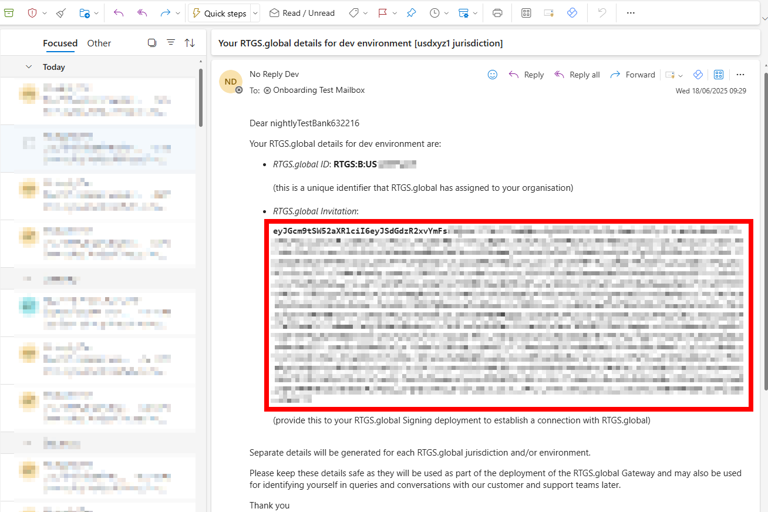
Your wallet seed and RTGS.global invitation are found in the onboarding welcome email:
| Field | Required | Notes |
|---|---|---|
| Wallet Seed | Yes | 32-character secret that establishes your organisation's cryptographic identity. Keep this secure — it cannot be recovered if lost. |
| Wallet Key | No | Auto-generated on first install (36 characters, typically a GUID). For existing installations, retrieve from your container secrets. |
| RTGS.global Invitation | No | Base-64 encoded string from the onboarding welcome email. Required for new installations; leave blank when redeploying an existing installation. |
Tab 5: Webhook Configuration
Configure one or more endpoints that will receive signing event webhook notifications. Up to 10 endpoints are supported.
| Field | Notes |
|---|---|
| Endpoint Identifier | A unique identifier for this webhook endpoint, e.g. primary-endpoint. |
| Webhook URL | The HTTPS URL that will receive event notifications, e.g. https://your-app.example.com/api/webhooks. |
| Whitelist Subnets (optional) | CIDR ranges allowed to call the webhook service. Leave empty to apply no restriction. |
Tab 6: Review + Create
Review the terms, which include RTGS.global having Contributor access to the managed resources created by the deployment. Check the agreement to the terms and conditions of use, then click Create.
Once deployed, the RTGS.global Signing API will be accessible on the signing service hostname you configured in the networking step.