The Emulator
The emulated RTGS.global API is hosted by a Docker container and does not interact with the RTGS.global network.
Tip: This quick start guide gets you up and running with RTGS.global APIs in a few steps without deploying any infrastructure.
Note: New features are deployed to the Emulator first, so it is consistently ahead of the Sandbox and Production platform capabilities.
Overview
The RTGS.global emulator exposes the RTGS.global API with canned responses and minimal processing, allowing you to try the API and become familiar with the typical responses you can expect.
Contracts and behaviours mirror production RTGS.global APIs, but are simulated and do not interact with any external systems. Endpoints are asynchronous in nature and results are posted back to a webhook using the CloudEvents message schema.
Production systems use Azure EventGrid to provide result messages. If you integrate using your own webhooks, the resulting payloads are representative of what production delivers.
Deploying the Emulator
The gateway emulator is provided as a container image for Docker Engine. It is intended for local desktop development, not as a centralised server-side application.
The image is available on Docker Hub: rtgsglobal/gateway-emulator
Step 1 — Install Docker
If Docker is not installed, follow the Docker getting started guide.
You will need two webhook endpoints that can accept POST requests to receive the full suite of notifications — one acting as your participant and one as a counterparty. Request Catcher is a convenient option for initial testing.
Warning: If you create your own webhooks, do not use a self-signed certificate. Use HTTP, or HTTPS with a trusted SSL certificate.
Pull the latest emulator image:
docker pull rtgsglobal/gateway-emulator
Step 2 — Configure Webhook Endpoints
Create two subdomains on Request Catcher to represent the two participants. For example:
https://initiating.requestcatcher.com— your organisationhttps://counterparty.requestcatcher.com— the partner organisation
Open each in a separate browser tab.
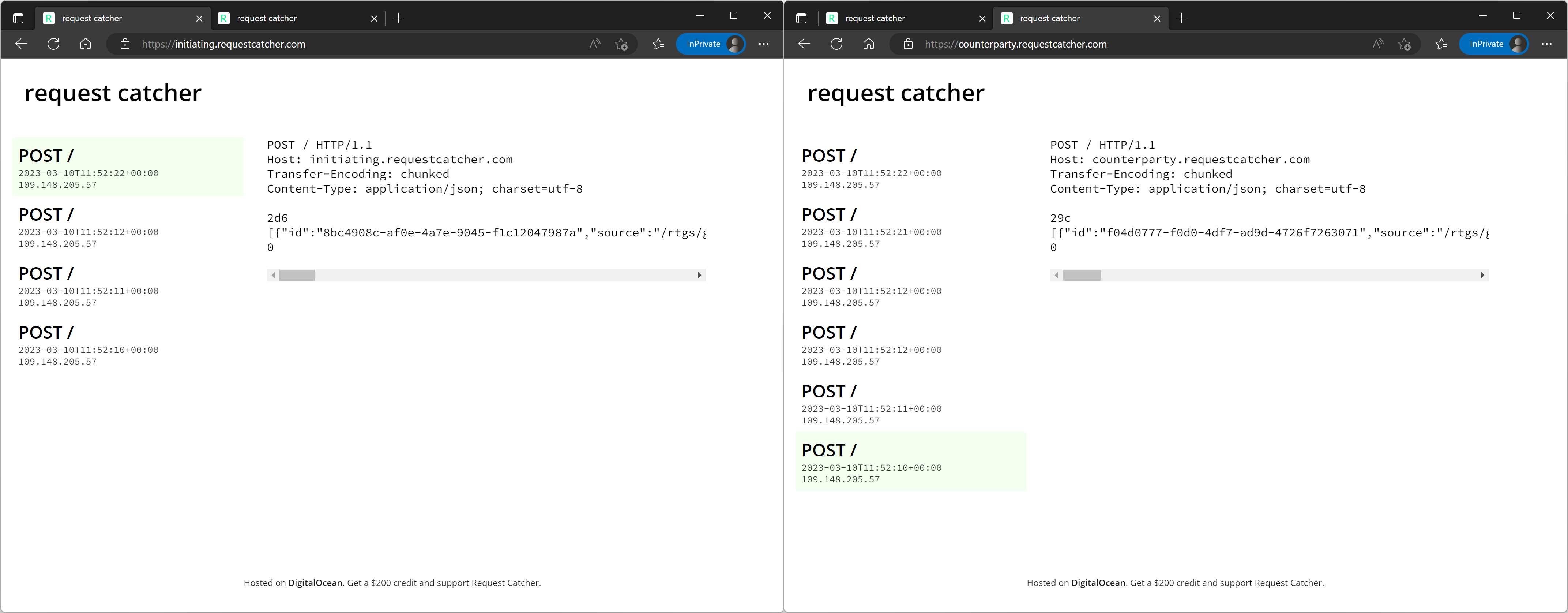
Step 3 — Launch the Emulator
Start the emulator container, passing your webhook URLs as environment variables:
docker run \
  -p 3001:8080/tcp \
  -p 3002:8090/tcp \
  -e "ParticipantWebhookUrl=https://initiating.requestcatcher.com" \
  -e "CounterpartyWebhookUrl=https://counterparty.requestcatcher.com" \
  rtgsglobal/gateway-emulator
Once running, browse the interactive API documentation:
http://localhost:3001/swagger/index.html— Gateway APIhttp://localhost:3002/swagger/index.html— Signing API
General Behaviours
- A valid HTTP POST request returns
202 Accepted. - Result messages are re-issued as POST requests to the configured webhook URLs.
- The webhook handler should respond with a
2xxstatus. Non-2xxresponses are retried up to 4 more times with exponential back-off starting at 1 second. - The full OpenAPI spec is available at
http://localhost:3001/swagger/v1/swagger.json.
Error Scenarios
To test error scenarios, pass specific trigger values in the request body. The webhooks will be called with appropriate error payloads. Details on how to trigger error scenarios for each product service are on the Docker Hub page.
Support
If you encounter problems following these instructions, contact support@rtgs.com.
The emulator is provided as-is and updated frequently. Pull the latest image regularly:
docker pull rtgsglobal/gateway-emulator
Licence and Copyright
The gateway emulator is free to use in standalone development environments. It cannot be used to replace the RTGS.global gateway, prove the operation of the gateway, offered for resale, or bundled with any other product or service.